
Choose a standard mechanical keyboard if you want deeper key travel, more switch and keycap choices, easier customization, or a stronger gaming and enthusiast ecosystem. Choose a low-profile keyboard if you prefer a flatter laptop-like feel, want less wrist elevation, need a cleaner compact desk setup, or regularly move between devices. A low-profile mechanical keyboard is the middle ground: it keeps mechanical switches while reducing height and travel, but it usually offers fewer compatible parts and a less distinctive typing feel than a standard mechanical model.
At A Glance
| Decision Point | Standard Mechanical Keyboard | Low-Profile Keyboard |
|---|---|---|
| Typing feel | Deeper travel and stronger switch variety | Flatter, shorter, more laptop-like feel |
| Customization | Usually the broadest keycap and switch ecosystem | Limited to moderate, especially for scissor models |
| Desk height | Taller and may need a wrist rest | Thinner and usually easier to position flat |
| Noise | Can be loud, especially with clicky switches | Often quieter, but switch and case still matter |
| Gaming | Broad layout and switch choices | Compact and quick-feeling, but not automatically faster |
| Portability | Often heavier and bulkier | Usually easier to carry and pair with laptops |
| Best for | Enthusiasts, writers, programmers, and customization | Laptop users, compact desks, shared spaces, and simple setups |
The Important Distinction: Mechanical And Low-Profile Describe Different Things
A mechanical keyboard uses individual switches beneath the keycaps. Those switches may be linear, tactile, clicky, optical, or Hall effect, depending on the model. A standard mechanical keyboard usually has taller keycaps, a deeper case, and more total key travel than a laptop-style keyboard.
Low-profile describes a shorter physical design. The keyboard may use scissor switches, rubber-dome switches, or low-profile mechanical switches. Logitech MX Mechanical, Keychron’s low-profile models, and NuPhy Air-series boards are examples of low-profile mechanical designs, while many laptop-style and office keyboards are low-profile without using traditional mechanical switches.
This distinction matters because a low-profile keyboard is not automatically quieter, faster, more ergonomic, or less durable. The switch type, keycap material, case construction, stabilizers, and software matter at least as much as the keyboard’s height.
- Standard mechanical: taller design, deeper travel, broad customization.
- Low-profile mechanical: shorter design with mechanical switches.
- Low-profile scissor or membrane: flatter and often closer to a laptop keyboard.
- Mechanical and low-profile can overlap; they are not mutually exclusive categories.
Typing Feel: Deep And Deliberate Vs Flat And Quick
Standard mechanical keyboards generally provide more travel and a more noticeable transition through each keystroke. Tactile switches add a bump, clicky switches add an audible click, and linear switches move smoothly from top to bottom. That wider range gives shoppers more control over the feel and sound of the keyboard.
Low-profile keyboards reduce the distance your fingers move. Many people find that familiar if they spend much of the day on a laptop. The result can feel quicker and lighter, but it may also feel less cushioned or less expressive than a taller mechanical board. Low-profile mechanical switches preserve some of the feedback and consistency of mechanical designs while shortening the travel.
Neither design guarantees faster typing. Shorter travel can reduce finger movement, but speed and accuracy depend on key spacing, layout, switch force, and how easily you adapt. Research on ultra-low-travel keyboards has not shown a simple universal performance advantage, and some users prefer the feel of more travel.
If you are moving from a laptop, a low-profile keyboard is usually the easier transition. If you enjoy the deliberate rhythm of a tactile switch or want to experiment with different switch forces, a standard mechanical keyboard gives you more room to customize the experience.
- Best for laptop-like familiarity: low-profile.
- Best for switch variety and pronounced feedback: standard mechanical.
- Best middle ground: low-profile mechanical with tactile or linear switches.
Desk Comfort And Wrist Position
Keyboard height changes how your wrists and forearms meet the desk, but height alone does not determine comfort. A tall mechanical keyboard may require a wrist rest or a lower chair and desk position. A thin keyboard can reduce the amount of wrist extension caused by a tall front edge, but it can still be uncomfortable if the keyboard is positioned too high or too far away.
OSHA recommends adjusting the keyboard and chair to reduce awkward wrist angles and maintain a neutral posture. It also notes that alternative keyboard designs may help some users maintain a neutral position, but research does not conclusively show that a particular alternative keyboard prevents discomfort or injury.
For a compact desk, a low-profile model can make the entire setup feel less bulky, especially when paired with a laptop or a low monitor stand. For long typing sessions, however, layout and posture matter more than the label. A standard mechanical keyboard used flat with a properly positioned chair may be more comfortable than a poorly positioned low-profile keyboard.
If you already have wrist, hand, or forearm pain, treat keyboard choice as one part of the setup rather than a medical solution. Consider breaks, neutral positioning, and professional advice when symptoms persist or worsen.
- Low-profile can reduce keyboard height, but it does not guarantee ergonomic comfort.
- A wrist rest may still be useful, especially with taller keycaps or a steep keyboard angle.
- Layout, desk height, chair height, and monitor position often matter more than switch type.
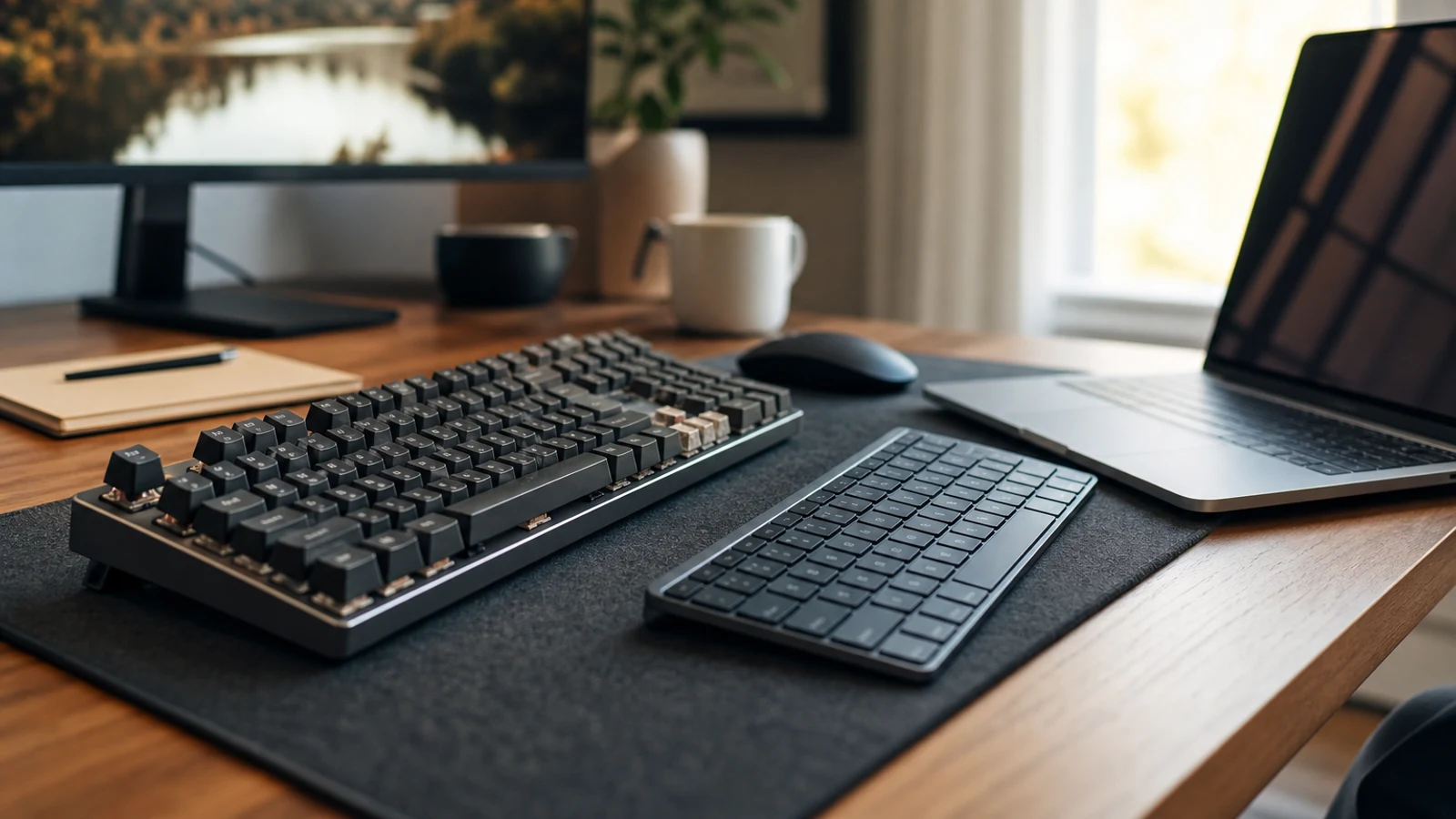
Compare options as you read
Explore options related to this guide. Check the exact product, seller, specifications and current price on Amazon. Image is illustrative.
As an Amazon Associate I earn from qualifying purchases.
Noise: The Switch And Case Matter More Than The Category
A standard mechanical keyboard is often associated with loud typing, but that is mainly because clicky switches and resonant cases are popular. Linear or tactile switches with dampening can be substantially quieter. Conversely, a low-profile mechanical keyboard can still be noisy if it uses clicky switches, hard keycaps, or a hollow case.
Low-profile designs may reduce some impact noise because the keys and case have less travel, but they are not automatically silent. Office neighbors, roommates, and shared-home workers should check the exact switch type rather than relying on the keyboard’s profile. A quiet tactile, silent linear, or scissor-style keyboard is usually a safer choice for noise-sensitive spaces.
For calls and shared desks, the most important specifications to check are switch type, whether the keyboard has dampening, and whether the manufacturer describes it as quiet. Reviews can help identify resonance or stabilizer noise, but sound is highly dependent on microphones, desks, keycaps, and typing force.
- Quietest direction: scissor or membrane, or a mechanical model with silent switches.
- Most likely to be loud: clicky switches and rigid, resonant cases.
- Do not assume low-profile means silent.
Gaming And Everyday Productivity
For gaming, both standard and low-profile mechanical keyboards can work well. The meaningful factors are switch behavior, rollover, debounce or scan performance, layout, wireless reliability, and whether the board includes gaming features such as remapping, rapid-trigger support, or adjustable actuation. Low-profile geometry by itself does not create a guaranteed competitive advantage.
A low-profile board may feel natural for fast repeated inputs and can leave more room for a mouse on a compact desk. It may also be easier to use with a laptop or a shallow desk tray. Standard mechanical boards offer a wider selection of gaming layouts and switches, including compact 60%, 65%, 75%, tenkeyless, and full-size designs.
For office work, the decision is usually more personal. A low-profile keyboard is a strong fit for people who move between laptops and desktops, prefer a flatter feel, or want a lighter-looking workspace. A standard mechanical keyboard makes more sense for writers, programmers, and hobbyists who care about switch feel, keycap profiles, sound, and repairability.
Do not buy based only on gaming marketing. If you mostly write documents, answer email, or use spreadsheets, comfort, noise, layout, and multi-device support are likely to matter more than specialized actuation features.
- Gaming priority: compare latency, switch behavior, layout, and software—not just height.
- Productivity priority: focus on comfort, sound, key spacing, and device compatibility.
- Full-size users should verify whether the low-profile model includes a number pad.
Customization, Repairability, And Compatibility
Standard mechanical keyboards usually have the strongest customization ecosystem. Many support hot-swappable switches, standard keycap sizes, multiple keycap profiles, aftermarket stabilizers, and extensive remapping software. This makes them appealing if you expect to change the keyboard over time.
Low-profile mechanical keyboards have improved, but their parts are often less interchangeable. Low-profile switches may use different stems, mounting patterns, or keycap dimensions than standard MX-style components. Some models accept only the manufacturer’s switch family, while others provide broader compatibility. Check the exact board before buying replacement switches or keycaps.
Low-profile scissor and membrane keyboards generally offer the least customization. Their strengths are simplicity, thinness, and familiar laptop-style operation rather than repairability. Some wireless office models also emphasize multi-device switching and long battery life over enthusiast features.
If you want a keyboard you can tune, start with the replacement ecosystem rather than the appearance. Confirm hot-swap support, switch compatibility, keycap compatibility, firmware support, operating-system shortcuts, and whether the layout uses standard-sized modifiers.
- Best customization: standard mechanical.
- Moderate customization: low-profile mechanical, depending on the model.
- Least customization: most scissor and membrane keyboards.
- Check switch and keycap compatibility before assuming parts are interchangeable.
Wireless Use, Portability, And Desk Space
Low-profile keyboards are often easier to carry because they are thinner and lighter, although the exact weight depends on the case and battery. They also pair naturally with laptops, tablets, and multi-device workstations. Logitech’s MX Mechanical, for example, supports switching among multiple devices and offers several low-profile mechanical switch choices.
Standard mechanical keyboards can also be wireless, but many enthusiast models are heavier because of metal plates, thicker cases, larger batteries, or sound-dampening materials. That weight can make them feel stable on a desk, but it is less convenient for travel.
For a small desk, compare more than front-to-back height. A 75% or tenkeyless keyboard can save more usable space than changing from standard height to low-profile. If you use spreadsheets or accounting software, removing the number pad may be a bigger compromise than choosing a taller keyboard.
Also verify the connection options. Bluetooth is convenient for tablets and office devices, while 2.4GHz wireless is often preferred for lower-latency desktop use. Wired mode can be useful for charging, firmware updates, or troubleshooting.
- Best for portability: low-profile wireless models.
- Best for stable desk use: heavier standard mechanical models.
- Biggest space decision: keyboard layout and number-pad size.
- Verify Bluetooth, 2.4GHz, wired mode, and multi-device support separately.
Which Keyboard Should You Buy?
Choose a standard mechanical keyboard if you want the broadest choice of switch feels, keycap profiles, layouts, and customization options. It is also the better starting point for enthusiasts who want to tune sound and feel or replace individual components over time. The drawbacks are greater height, potentially more noise, more desk bulk, and a steeper learning curve when choosing switches and layouts.
Choose a low-profile mechanical keyboard if you want mechanical feedback without the height of a traditional board. It is a sensible compromise for laptop users, compact desks, shared workspaces, and people who want a modern wireless keyboard with a flatter profile. The trade-off is usually a smaller accessory ecosystem and a typing feel that may not satisfy fans of deep-travel mechanical boards.
Choose a low-profile scissor or membrane keyboard if your priorities are thinness, quiet operation, simple office use, and laptop-like familiarity. Skip it if you specifically want replaceable switches, pronounced tactile feedback, or extensive key remapping.
The best purchase is not determined by whether a keyboard is called mechanical or low-profile. Start with your preferred feel, then check height, sound, layout, connection options, compatibility, and return policy. If possible, buy from a seller with a practical return window because typing feel is difficult to predict from specifications alone.
- Buy standard mechanical for customization and deeper key feel.
- Buy low-profile mechanical for a flatter compromise with mechanical switches.
- Buy low-profile scissor or membrane for simplicity, thinness, and laptop familiarity.
- Skip any keyboard whose layout, connection method, or switch compatibility does not fit your daily workflow.
Questions & Answers
Practical follow-up questions readers often ask before acting or buying.
Is a low-profile keyboard better than a mechanical keyboard?
Not universally. Low-profile describes the keyboard’s height, while mechanical describes the switch mechanism. A low-profile keyboard may be mechanical, scissor, or membrane. Choose low-profile for a flatter, more compact feel and standard mechanical for deeper travel and broader customization.
Are low-profile mechanical keyboards quieter?
They can be, but not automatically. Noise depends heavily on the switch type, keycaps, stabilizers, and case. Clicky low-profile switches can still be loud, while a standard mechanical keyboard with silent switches may be quieter.
Are low-profile keyboards better for your wrists?
A lower keyboard may reduce wrist extension for some desk setups, but it is not a guaranteed ergonomic solution. Neutral positioning, desk height, chair height, keyboard angle, and breaks are also important. Persistent pain should be addressed with qualified professional guidance.
Are mechanical keyboards faster for typing or gaming?
There is no universal speed advantage. Switch force, travel, layout, adaptation, and software can affect results. For gaming, latency and actuation features may matter more than whether the board is standard-height or low-profile.
Can you put regular keycaps on a low-profile mechanical keyboard?
Usually not without checking compatibility. Low-profile keyboards often use different switch stems, keycap heights, or spacing. Confirm the manufacturer’s compatibility information before buying replacement keycaps or switches.
Which is better for a shared office?
A quiet low-profile keyboard or a keyboard with silent switches is usually the safer choice. Avoid clicky switches unless you know the sound will not disturb nearby people, and check reviews for case resonance and stabilizer noise.
Sources & Further Reading
Find options for your needs
Explore options related to this guide. Check the exact product, seller, specifications and current price on Amazon. Image is illustrative.
As an Amazon Associate I earn from qualifying purchases.